


Creating Folders in Boomi Integration: A Simple Guide
Category : Boomi
Keeping your Boomi workspace tidy makes development smoother and collaboration easier. Folders help you organize components like processes, connectors, and shared elements into logical groups.
How to Create a Folder in Boomi
- Open Component Explorer Use the left panel in Boomi AtomSphere to view your components.
- Select the Parent Folder Choose the folder where you want to add a new subfolder.
- Click the Vertical Three Dots (⋮) Located next to the folder name—this opens folder options.
- Choose “New Folder” A dialog box will appear. Enter your desired folder name.
- Click OK to Save Your new folder will now appear under the selected parent.
Folder Naming Tips
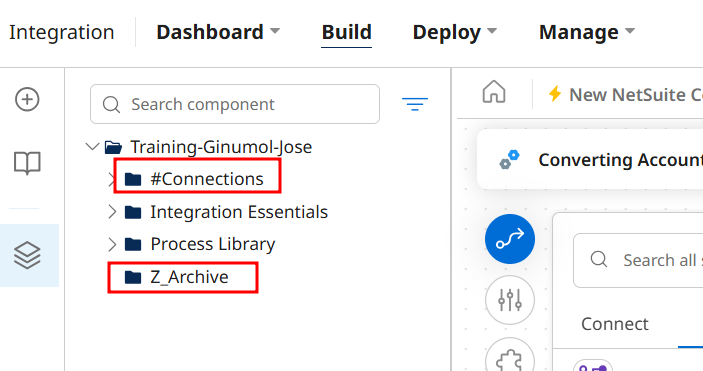
- Prefix with
#to pin folders at the top of the list Examples:#Connections - Prefix with
Z_to push folders to the bottom Examples:Z_Archive - Use clear, consistent naming to help your team navigate easily.
Tags:
#creating folders
#folders